
Quick Summary:
Editing MKV files is more challenging than working with formats like MP4. Since MKV is a flexible container format, trimming or cutting it requires specialized software. Fortunately, there are reliable MKV trim tools that make the process much smoother. These dedicated tools enable efficient cutting, splitting, or editing of MKV files. In this post, we selected the most reliable MKV cutters available today. We selected these tools based on their trimming accuracy, usability, and overall performance to help you save time searching for the right software.

The Matroska format, commonly known as MKV, is a multimedia container that can store multiple media types in a single file. An MKV file can include video, multiple audio tracks, subtitles, chapters, and metadata, all packaged together. However, because MKV is a container format, editing or trimming it can be more complex than working with simpler formats.
Trimming MKV files can be difficult because of the GOP (Group of Pictures) structure. Most MKV files use inter-frame compression, meaning many frames rely on an I-frame (Keyframe) to display correctly. Trimming anywhere else often results in a black screen or pixelation unless the software supports Smart Encoding or Keyframe-to-Keyframe cutting.
How We Rate:
Our editorial team tested over 15+ MKV cutters on Mac and Windows using a 2GB H.264 MKV sample. We prioritized tools that maintained subtitle integrity and audio-to-video synchronization.
| MKV Trimming Software | Platform Accessibility | Price | Lossless Trim | Extra Features | Ease of Use | Best For |
|---|---|---|---|---|---|---|
| AnyMP4 Video Converter Ultimate | Windows and Mac | Free, with upgrades starting at $18.75 |  |
3D maker, GIF maker, video stabilizer, denoiser, video effects optimizer, video upscaler, and more | Moderate | Professional MKV trimming and full video editing |
| Avidemux | Windows, Mac, Linux, and BSD | Free | |
Basic video editing, denoising, sharpening, deinterlacing, and transforming | Moderate | Simple and free MKV trimming |
| MKVToolNix | Windows, Mac, and Linux/Unix | Free | |
Merger, audio/subtitles extractor, add attachments, header properties editor, and audio track manipulation | Technical | Advanced MKV container editing and precise splitting |
| Online Video Cutter | Web | Free, with upgrades starting at $6 |  |
Volume booster, speed controller, stabilizer, looper, and logo remover | Easy | Quick online MKV trimming |
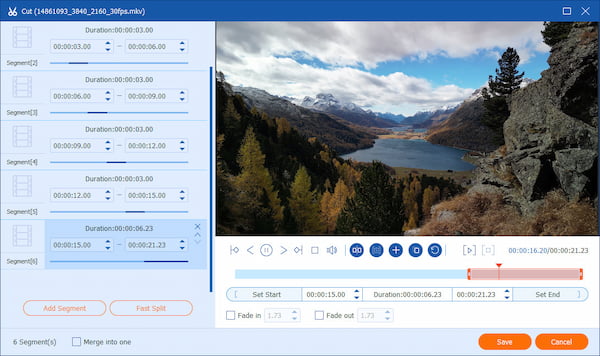
AnyMP4 Video Converter Ultimate is a multimedia software bundle for advanced editing beyond media conversion. It works on both Windows and Mac systems, ensuring accessibility across platforms. As a professional MKV cutter, it provides highly accurate trimming features while maintaining excellent video quality. It supports lossless MKV trimming, allowing you to remove unwanted segments while perfectly preserving the original resolution and clarity.
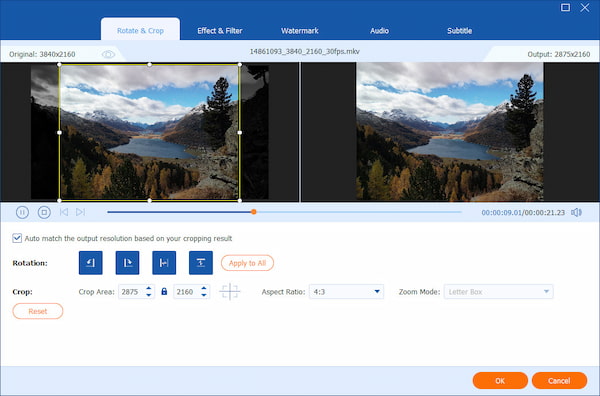
Moreover, AnyMP4 Video Converter Ultimate offers multiple ways to trim MKV files. You can choose Fast Split for rapid segmenting, input specific Start and End Times for surgical precision, or manually adjust trimming handles for frame-level control. Aside from trimming, it can convert MKV files into MP4, MOV, WMV, AVI, and other formats. The software also includes built-in editing tools like rotate, crop, flip, merge, filter, and subtitle insertion.
Secure Download
Secure Download
What You'll Like:
What to Consider:
When I used AnyMP4 Video Converter Ultimate to trim multiple MKV files, the process felt smooth and efficient. The result retained the original clip's visual quality. The Fast Split feature effectively avoids the audio-sync issues common in cheaper cutters.
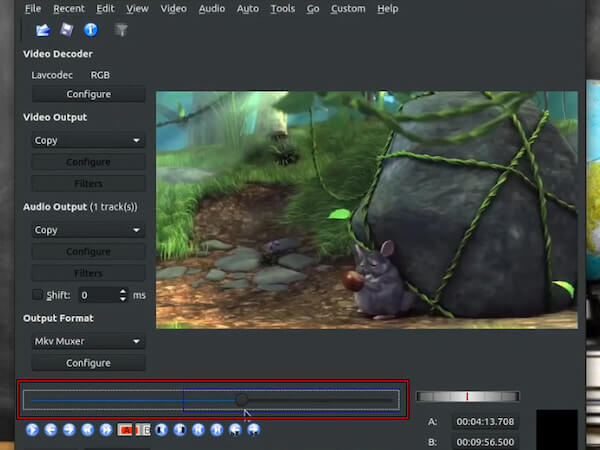
Avidemux is an open-source video editor designed for basic cutting, filtering, and encoding. It supports multiple file types, including MKV, making it useful as an MKV trimmer. It is a perfect video trimmer for those who want to edit videos without spending on premium software. It provides straightforward trimming controls to select a video segment and remove unwanted portions. It can cut MKV files without re-encoding, speeding up the process.
What You'll Like:
What to Consider:
While testing Avidemux, I used the A and B marker system to define the beginning and end of the segment I wanted to keep. At first, the interface looked slightly outdated compared to modern editors, but once I understood the workflow, trimming clips became quite easy. Avidemux works best for users who prefer lightweight, no-cost software.
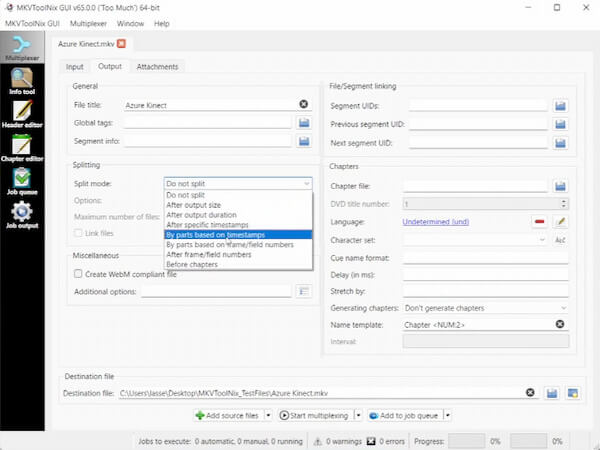
MKVToolNix is a toolkit designed for editing and managing Matroska video containers. It specializes in manipulating the structures of MKV files, including tracks, chapters, and segments. This MKV video cutter includes advanced splitting options that let you trim by timestamps, specific parts, or chapter points. With these capabilities, it works effectively as a Matroska cutter for handling MKV files without altering the underlying video streams.
What You'll Like:
What to Consider:
When I experimented with trimming an MKV video using MKVToolNix, the process felt more technical than in a typical video editor. Instead of dragging a timeline slider, I entered exact timestamps to split the file at specific points. Unlike others, this tool does not re-encode. It remuxes the stream, making the cut instant and 100% lossless.
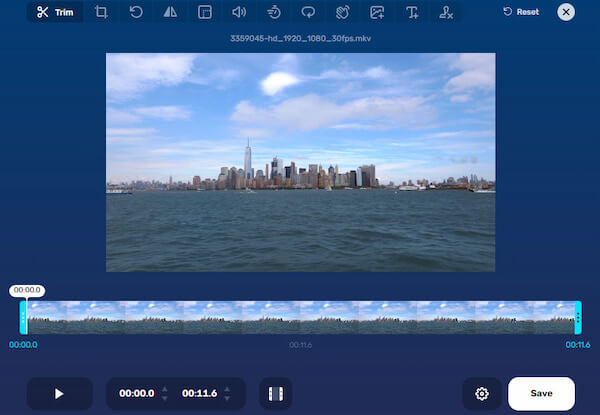
Online Video Cutter is a browser-based editing platform that enables users to trim and edit videos. It supports nearly any file format, including MKV, making it a convenient MKV video trimmer for quick online edits. It provides a visual timeline that lets users easily select the start and end points. In addition to trimming, it includes basic features such as cropping, rotating, flipping, and adjusting the video frame.
What You'll Like:
What to Consider:
When I tested Online Video Cutter, the process was simple. The interface felt clean and easy to understand, which made the editing process very quick. However, I noticed that upload speed is slow, especially when working with large MKV files. For occasional trimming, this tool works well. But if you want a quick solution, consider switching to another online video cutter.
Can I trim MKV files without re-encoding?
Yes, you can trim MKV files without re-encoding, provided the software supports direct stream copy or container-level cutting. Avidemux and MKVToolNix allow users to remove segments from an MKV video while keeping the original audio and video streams intact.
What is the best free MKV cutter?
The best MKV cutter depends on your needs, but Avidemux is a reliable option. It is open source, lightweight, and supports precise trimming with start and end markers. For more advanced MKV container editing, MKVToolNix is another strong free option.
Why are my trimmed MKV files still large?
Trimmed MKV files can remain large because they often contain high-bitrate video streams, multiple audio tracks, subtitles, and other embedded data. Even if you remove a video portion, the remaining clip may still contain high-quality video data, which can take up space. To reduce the file size, compress the video using AnyMP4 Video Converter Ultimate.
What are the risks of using an online MKV trimmer?
Using an online MKV trimmer can be convenient, but there are several risks to consider. When you upload videos to an online service, external servers process your files. This can raise privacy and data security concerns, especially for sensitive content.
Trimming MKV videos can be challenging because they contain multiple tracks, subtitles, and high-quality video streams. Fortunately, the right MKV cutters make the process much easier. In this guide, we explored four reliable tools. For a powerful yet beginner-friendly solution for trimming MKV files with precision and high quality, AnyMP4 Video Converter Ultimate is an excellent option. It provides multiple trimming methods, fast processing, and additional editing tools in one intuitive interface.
Secure Download
Secure Download
 Updated by Mark Cristobal to Editor,Edit Video
More readings
 MOV Cutter - How to Split MOV Video Online and Offline 2026
How do I cut or split a MOV file online? Which video cutter is the best? This post shares 2 MOV cutters to trim MOV videos online and offline.
 5 Best 3GP Audio and Video Cutters for Windows and Mac OS X
Find the top 5 3GP cutters to edit 3GP audio and video files easily on Windows and Mac, including free and professional options.
 5 Best Online Audio Cutters to Trim MP3 Songs Free
Discover 5 easy-to-use online audio cutters to trim MP3 songs for free, plus a professional audio trimmer for advanced editing.
 8 Best Video Splitters for Cutting Large Video Clips [2026 List]
Find the top 8 video splitters to cut large video clips quickly without losing quality, including free, online, and professional tools.
 Add your comments to join the discussion here