
Quick Picks:
Many firmly believed that video cutting is the most basic editing skill every editor should have. However, those using clunky software often end up with messy results; some deal with reduced video quality, while others struggle with unsynchronized audio. Many beginners rely on free editors but end up with compromised output or unwanted watermarks on their videos. This is why choosing the right MOV cutter is important. Dedicated tools provide proper trimming controls and maintain video quality. In this post, we will introduce some of the best MOV cutters online and offline available today. We will help you quickly find the right tool for trimming MOV files, whether you need a simple browser-based cutter or a more advanced desktop editor. By the end, you can choose a tool that fits your workflow and avoid the common problems that come with using unreliable video cutters.

The MOV format is a multimedia container file developed by Apple for the QuickTime media framework. It can store multiple media types in a single file, including video, audio, subtitles, and metadata. MOV files use a container format that organizes these elements into separate tracks, keeping them synchronized during playback. Professional video editors and high-quality media productions widely use this format because of its flexible structure.
How We Test:
Our editorial team tested 12+ MOV cutters across Windows, Mac, and online. We used a 1.5GB 4K Apple ProRes MOV sample and a 500MB H.264 clip. We prioritized tools that offer lossless trimming to ensure zero quality loss. We evaluated each tool based on its ability to maintain QuickTime metadata integrity, frame-accurate precision, and audio-to-video synchronization during high-bitrate exports.
| MOV Trimming Tools | Platform(s) | Price | Max File Size | Lossless Cutting | Watermark | Primary Feature (MOV) | Best For |
|---|---|---|---|---|---|---|---|
| AnyMP4 Video Converter Ultimate | Windows and Mac | Free, with upgrades starting at $18.75 | Unlimited |  |
 |
Advanced MOV trimming with segment splitting, start/end trimming, and batch editing | Professional and frequent video editors needing precise trimming |
| QuickTime Player | Mac | Free | Unlimited | |
|
Built-in MOV trimming using drag-handle timeline | Mac users needing quick, simple MOV cuts |
| Clideo MOV Cutter | Web | Free, with upgrades starting at $9 | 500 MB | |
|
Cloud-based trimming via browser timeline | Users wanting quick online edits without installing software |
| Online Video Cutter | Web | Free, with upgrades starting at $6 | 500 MB | |
|
Fast browser-based trimming with simple timeline tools | Quick edits and lightweight video trimming tasks |
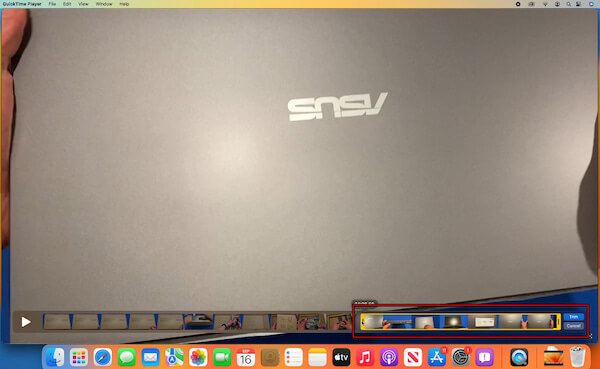
QuickTime Player is Apple’s built-in solution for macOS that serves as a free MOV cutter. Its simple Trim feature lets you quickly drag the yellow handles to save the desired section. QuickTime supports basic editing, such as splitting and combining MOV files. While it lacks batch processing, it preserves the original MOV quality. Additionally, it is ideal to use to trim QuickTime videos quickly without learning complex software.
Learn from this post to trim a video in QuickTime.
What You'll Like:
What to Consider:
I used QuickTime to shorten a 6-minute MOV down to a 2-minute highlight clip. The drag-handle trimming was intuitive, and the export retained perfect quality. QuickTime Player is a precise video cutter tool for Mac users who need a trimmer that’s simple, fast, and preserves quality.
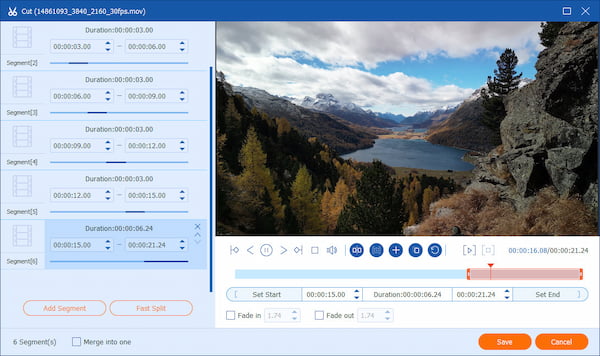
AnyMP4 Video Converter Ultimate is a powerhouse for editing MOV files with precision. It allows cutting large MOV files into smaller clips with multiple methods. You can use Fast Split to divide a video, set exact Start and End times for precision, or manually drag the trimming handles. Beyond trimming, it converts MOV to MP4, MKV, WMV, AVI, and other formats. In addition to the MOV trimmer, it includes built-in editing features such as cropping, rotating, and adding subtitles. Remarkably, GPU acceleration ensures fast processing even for large files. In terms of UI, it balances accessibility for beginners and advanced options for professional and beginner video editors.
Secure Download
Secure Download
What You'll Like:
What to Consider:
While trimming a 15-minute MOV, I appreciated how fast and accurate the manual drag handles were. AnyMP4 Video Converter Ultimate excels as a video cutter, offering advanced trimming, batch processing, and professional-quality output.
Editor’s Note: During our test, AnyMP4 Video Converter Ultimate trimmed a 2.4GB 4K MOV file in 18 seconds using GPU Hardware Acceleration, whereas the online tools took over 5 minutes to upload the file.
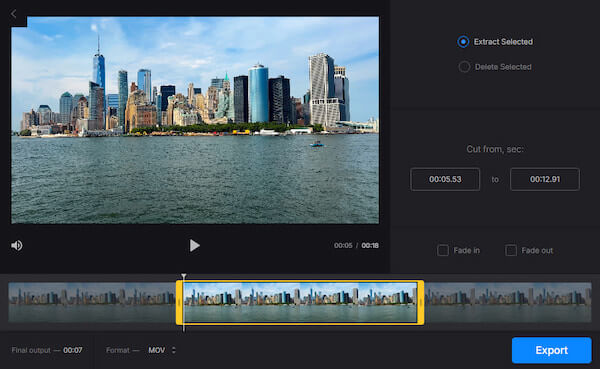
Clideo MOV Cutter is a convenient MOV cutter designed for trimming videos directly in the browser. As an online video cutter, it works entirely in the cloud. It lets you upload a video from your device, Google Drive, or Dropbox and trim it in seconds. Clideo also supports cropping, resizing, and format conversion, making it a user-friendly video editing solution. Since it is an online MOV cutter, it’s accessible on Windows, macOS, or even mobile devices.
What You'll Like:
What to Consider:
When I tried trimming a MOV clip using Clideo, the process was straightforward. The cloud processing meant I didn't have to worry about installing anything or dealing with software updates. It is a practical option for quick trimming when you want an uncomplicated editing workflow.

Online Video Cutter is another browser-based video trimmer designed for quick cutting. It is a reliable MOV trimmer for those who want instant edits without installing heavy software. It works smoothly if you need to edit MOV on Windows or other operating systems, since everything runs in the cloud. In addition to trimming, it includes tools for cropping, rotating, and adjusting resolution. Because of its versatility, many users consider it among the best MOV editor options available.
What You'll Like:
What to Consider:
While testing Online Video Cutter, I uploaded a MOV file and quickly shortened a long recording into a smaller highlight clip. The timeline controls were responsive, and exporting the edited video only took a few minutes. Online Video Cutter also serves as an MP4 cutter, letting you trim MP4 clips with the same simple timeline controls.
Can I cut MOV files online for free?
Yes, you can cut MOV files online for free using browser-based video editing tools. These tools are convenient because they work on different operating systems. However, free versions often have file-size limits, slower upload speeds, and watermarks on exported files.
Does using a MOV cutter convert the file?
Not always. Some MOV cutters trim the video and keep the file in the same format. Meanwhile, others re-encode or convert it during export. Desktop software often offers an option to keep the original MOV format when trimming, helping maintain quality and the file structure.
How do I trim an MOV file without losing quality?
You should use AnyMP4 Video Converter Ultimate to trim an MOV file without losing quality. This method removes unwanted sections without re-encoding the entire video, thereby preserving the original resolution and overall quality.
Is QuickTime Player the best MOV cutter for Mac?
QuickTime Player is the best option available for Mac for simple trimming tasks. It provides a very straightforward trimming feature, making it ideal for quick edits. However, it may not be the best option for advanced editing, as it lacks detailed timeline editing.
Choosing the right MOV cutter online or offline ensures clean, high-quality trims without messy cuts or watermarks. Whether you need quick browser edits or precise desktop trimming, dedicated tools make the process smooth. For professional results, AnyMP4 Video Converter Ultimate offers precise MOV cutting, batch trimming, and high-quality exports. This powerful tool can handle your video editing tasks quickly and professionally.
Secure Download
Secure Download
 Updated by Mark Cristobal to Editor, Edit Video
More readings
 How to Add Audio to MP4 Video on Windows/Mac/Online
Looking for tools for trimming or cutting audio? Discover the top 10 best audio trimmer tools for Windows, Mac, and mobile devices.
 8 Lossless Video Cutters for Computer/Mobile/Online 2026
Need a fast video cutter? Review the top 8 video cutters for MP4, MOV, and 4K videos. Learn how to trim and split videos without quality loss on PC and Mac.
 15 Best MP4 Cutters in 2026: Lossless Trimming (Online & Offline)
Looking for a fast MP4 cutter? We tested 15 top video trimmers to help you split MP4 files without re-encoding. Choose the best tools for Windows & Mac.
Top 4 MKV Cutters for Fast & Lossless MKV Files Trimming
Looking for a fast MP4 cutter? We tested 15 top video trimmers to help you split MP4 files without re-encoding. Choose the best tools for Windows & Mac.
 Add your comments to join the discussion here