
Quick Summary: Is Greenshot Worth It?
Greenshot is a feature-rich, open-source screenshot capture and annotation tool. It has gained popularity among users seeking a versatile solution for capturing and enhancing images on their computer screens. With several capture modes and annotation features, it aims to simplify the process of creating, editing, and sharing screenshots. This Greenshot review will explore the software’s key features, pros, and cons. This way, you will have an idea and determine if it’s the right tool for your screen capture needs. Also, we will present three unique alternative tools that may suit your requirements.
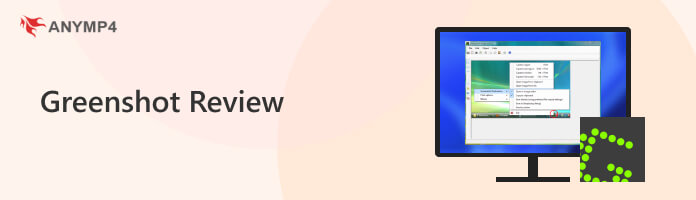
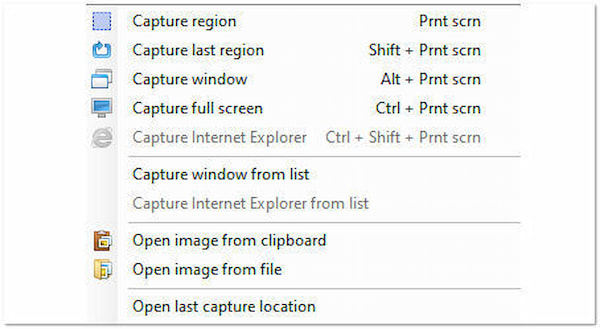
Greenshot’s screen capture on Mac and Windows is one of its standout features. You can effortlessly take snapshots of computers’ entire screens or specific areas of interest, whether a single application window, a selected region, or even a lengthy webpage. However, this tool is limited to screen capturing. It doesn’t offer other features like screen recording.
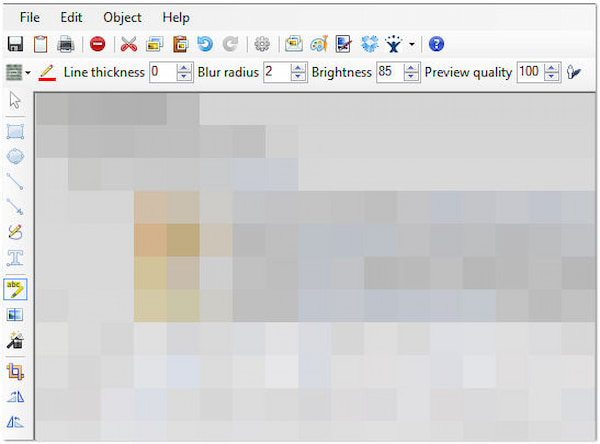
Greenshot image editor is a suite with annotation tools that allow you to add context and clarity to your screenshots. It offers various tools, including text, boxes, shapes, arrows, highlights, and freehand drawing. However, these tools don’t have names, which may be complicated for you and require familiarity. You need to test them first before knowing their functions.
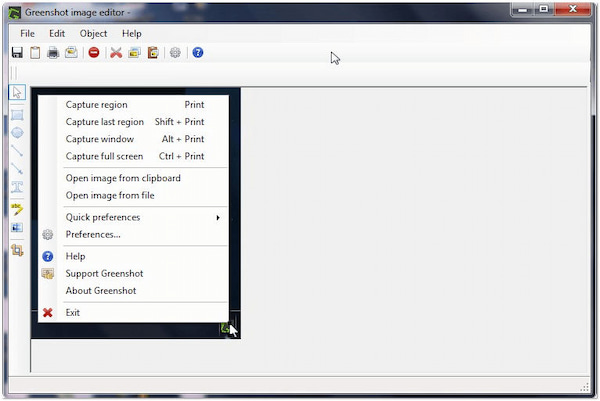
The Greenshot snipping tool’s quick editing features save users time. After capturing a screenshot, you can instantly make basic adjustments and edits directly within the application. However, the software’s quick editing may not be ideal for complex projects involving multiple images or complicated editing requirements.
A major concern for enterprise users and sysadmins on forums like Reddit is the security of open-source tools. So, is Greenshot safe?
The short answer is yes. Greenshot is a legitimate, open-source project hosted on GitHub. Because the source code is publicly available for anyone to audit, the risk of hidden malware or spyware is incredibly low. Many IT professionals and sysadmins deploy it across corporate networks without issue.
Pro Tip for Safe Download: Always download Greenshot directly from the official website or their GitHub repository. Avoid third-party software hosters (like CNET or Softonic) that might bundle unwanted adware into the installer.
| Features | Greenshot | AnyMP4 Screen Recorder | ShareX | Snagit |
|---|---|---|---|---|
| Supported OS | Windows (Free), Mac (Paid) | Windows, Mac | Windows Only | Windows, Mac |
| Pricing | Free (Open Source) | Free Trial / Premium | Free (Open Source) | Premium (One-time) |
| Video Recording |  |
 Yes (Up to 4K, Game, Audio) Yes (Up to 4K, Game, Audio) |
Yes (Basic) |
|
| Scrolling Capture | ⚠️ Buggy on modern browsers | |
|
|
| Annotation Tools | Basic (Shapes, Text, Highlights) | Advanced (Blur, Stickers, Callouts) | Advanced | Professional |
| Best Used For | Quick, simple static snapshots | High-quality video & screen capturing | Automated workflows | Professional tutorials |
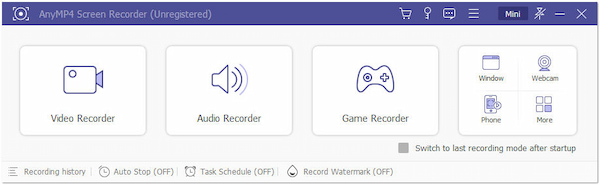
While Greenshot is a fantastic utility for static images, today's digital workflow often demands more. If you find yourself frustrated by Greenshot's inability to record video, or if you frequently encounter errors when trying to capture a long, scrolling webpage, AnyMP4 Screen Recorder is the perfect upgrade.
It bridges all the gaps left by Greenshot. Not only does it provide a robust, bug-free scrolling capture and advanced annotation tools (like blurring sensitive information), but it also serves as a premium 4K video recorder. Whether you need to record a webinar, capture gameplay, or create a detailed video tutorial with voiceover, AnyMP4 handles it seamlessly in one user-friendly dashboard.
Secure Download
Secure Download
PROS
CONS
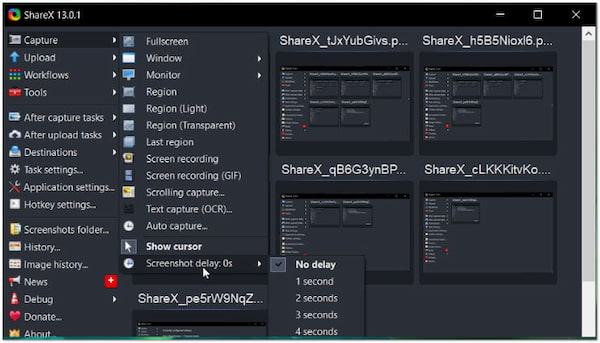
Another option as a Greenshot alternative is ShareX. It is a free, open-source screen capture and file-sharing tool. It offers comprehensive screen capture options, including full-screen, region, window, and scrolling capture. Also, it allows you to annotate and edit the screenshots and upload or share them to image hosting services or social media platforms.
PROS
CONS
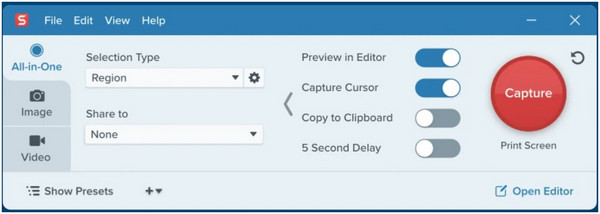
The next sub we have is Snagit, a Greenshot for Mac alternative. It is a professional screen capture and image editing solution available for Mac and Windows users. It is known for advanced screen capture and recording functionalities, with features like video capture, scrolling capture, and annotation tools. Also, you can find more Snagit alternatives here to take a screenshot conveniently.
PROS
CONS
Choosing the right alternative depends heavily on your daily workflow. Here is the verdict based on user reviews and our testing:
Choose Greenshot if: You are a Windows user who needs a lightweight, free tool for simple static screenshots and basic highlighting without any complex menus.
Choose ShareX if: You are a tech-savvy user or developer. It's completely free and open-source, offering incredibly powerful automated workflows (like instant upload to Imgur), but it has a steep learning curve and lacks Mac support.
Choose Snagit if: You are writing official corporate documentation or creating standard operating procedures (SOPs). It has enterprise-grade annotation tools (like Step tools and templates) but comes with a hefty one-time price tag ($62.99).
Choose AnyMP4 Screen Recorder if: You need an all-in-one powerhouse. If you find Greenshot's lack of video recording limiting, AnyMP4 bridges that gap. It offers flawless scrolling screenshots, professional blurring tools for sensitive data, and top-tier 4K screen recording for tutorials or gameplay—all wrapped in an intuitive interface available on both Windows and Mac.
Why is the Greenshot scrolling capture not working?
Greenshot's scrolling capture often struggles with modern, highly dynamic web browsers like Chrome or Edge. It can cause images to overlap or be cut off. If you frequently need to capture long pages, switching to an alternative with a dedicated scrolling engine, like AnyMP4 Screen Recorder, is highly recommended.
Is Greenshot for Mac free?
No. While the Windows version is completely free and open-source, Greenshot charges a small, one-time fee on the Mac App Store to cover Apple's developer program costs.
Is Greenshot safe?
YES! It is safe to use. It’s open-source software, which means its source code is available for scrutiny, reducing the risk of malicious code or vulnerabilities. However, it’s essential to download it from reputable sources to ensure you’re getting the legitimate, safe version.
Does Greenshot capture video?
NO! It is primarily designed for capturing static screenshots of your computer screen. It does not have built-in features for capturing video or screen recording. For capturing video, consider using AnyMP4 Screen Recorder’s Video Recorder feature.
Does Greenshot screen record?
NO! It is not intended for screen recording. It specializes in capturing still images of your screen and provides annotation features for editing those screenshots. For screen recording activities, tools like AnyMP4 Screen Recorder offer several recording features for different purposes, including Game Recorder, Phone Recorder, Window Recorder, and more.
Is Greenshot any good?
YES! It is a good and reliable tool for taking screenshots and annotating them. It’s especially valuable for users who need flexible capture options and basic annotation tools. However, it is limited to taking screenshots. It is not an ideal option for video/screen recording or advanced image editing.
That’s all we have for our Greenshot review! The software offers an efficient solution for capturing and annotating screenshots. Its versatility in capture options, customizable hotkeys, and quick editing features is valuable for a broad user base. However, it’s important to recognize that it is not designed for video capture or complex image editing. If you’re searching for a full-featured screen-capturing and recording tool, exploring alternative software like AnyMP4 Screen Recorder is what you need.
 Posted by Alice Thorne to Screenshot
More readings
 ScreenFlow for PC: Capture Screen and Edit Video on Windows
This ScreenFlow for PC will outline the five top-notch alternatives for ScreenFlow. We will provide their pros and cons as your guide for picking the best tool.
 Top 5 Camtasia Alternatives for Powerful Screen Recording
Looking for Camtasia alternatives? Discover feature-rich screen recording software to level up your content creation. Find the best fit for your needs here!
 Top 6 OBS Alternatives to Screen Recording and Streaming
Looking for an OBS alternative? Discover powerful tools with user-friendly interfaces, advanced features, and seamless integration for content creation.
 Product Details and an Unbiased Review of DU Screen Recorder
This is an unbiased review for DU Screen Recorder. Before downloading and installing it, you'd better read it carefully in order to make the best decision.
 Add your comments to join the discussion here